In today’s fast-paced world, the security of our homes and the well-being of our loved ones are paramount concerns. Many homeowners ponder whether an indoor security camera is a worthwhile investment. These devices have evolved beyond simple surveillance, offering a comprehensive suite of features designed to provide peace of mind and enhanced protection. From deterring potential threats to keeping an eye on your children, pets, or elderly relatives, an indoor security camera can be an invaluable addition to any modern home. This guide will explore the various types, essential features, and top models to help you make an informed decision about integrating this smart technology into your life.
Overview of Indoor Security Cameras
An indoor security camera is a surveillance device specifically designed to monitor the interior spaces of your home or business. Unlike their outdoor counterparts, which are built to withstand harsh weather, indoor cameras typically prioritize discreet aesthetics and advanced smart features tailored for internal environments. Their primary function is to capture and record video footage, often complemented by audio, to provide a vigilant eye on your property when you cannot be physically present.
The importance of indoor security cameras in safeguarding your home cannot be overstated. They act as a critical deterrent to burglars who prefer to avoid being caught on camera, significantly reducing the risk of theft and vandalism. In the unfortunate event of an incident, the high-quality footage captured by these cameras can serve as crucial evidence for law enforcement, aiding in the identification of suspects and the recovery of stolen items. Beyond crime prevention, these cameras offer an unparalleled sense of security, allowing you to monitor your home from anywhere, anytime.
Common applications for an indoor security camera are extensive and varied. Many parents use them as sophisticated baby monitors or to check in on children arriving home from school, ensuring their safety and whereabouts. Pet owners find them indispensable for monitoring their furry friends, especially those prone to mischief or separation anxiety, with some even offering two-way audio for interaction. They are also excellent for supervising service providers such as housekeepers or contractors, verifying that tasks are completed as expected. Furthermore, these cameras can help verify alerts from other security sensors, distinguishing between a genuine threat and a false alarm triggered by a pet or a minor household event.
Common Types of Indoor Security Cameras
The market for indoor security cameras offers a diverse range of options, each with unique advantages and disadvantages. Understanding these different types can help you select a system that perfectly aligns with your specific needs and home environment.
IP Cameras (Network Cameras)
|
Our Picks for the Best Indoor security camera in 2026
As an Amazon Associate I earn from qualifying purchases.
|
||
| Num | Product | Action |
|---|---|---|
| 1 | Tapo 1080P Indoor Wired Security Camera - Works as a Baby & Pet Monitor, Motion Detection, 2-Way Audio, Siren, Night Vision, Subscription-Free Local or Optional Cloud, Works with Alexa, C100(4-Pack) |

|
| 2 | AOQEE 2K Cameras for Home Security-Outdoor/Indoor Camera for Dog/Cat/Pet/Nanny/Baby/Elderly, Color Night Vision, White Light, Siren, 24/7 SD Recordings, Works with Alexa, Plug in (C1-White-2pack-2.4G) |
|
| 3 | TP-Link Tapo 1080P Indoor Security Camera for Baby Monitor, Dog Camera w/Motion Detection, 2-Way Audio Siren, Night Vision, Cloud & SD Card Storage, Works w/Alexa & Google Home (Tapo C100) |
|
| 4 | Cinnado Security Camera Indoor-2K 360° WiFi Cameras for Home Security,Pet/Dog/Baby Camera with Phone app, 2-Way Audio, Night Vision, 24/7 SD Card Storage, Works with Alexa & Google Home (2.4Ghz)-D1 |
|
| 5 | Blink Mini 2K+ (newest model) – Plug-in Home & Pet Indoor Security Camera with 2K video resolution, night vision, enhanced audio, motion detection – 2 cameras (Black) |
|
| 6 | GNCC 2K Security Cameras 4pcs, Home Security Camera Indoor with 360° Motion Detection for Pets/Baby/Dog, Two-Way Audio, Night Vision, 24/7 SD Card Storage, Cloud Storage, Compatible with Alexa |
|
| 7 | Tapo 2K Indoor Pan/Tilt Wired Security Camera - Works as a Baby Monitor & Pet Camera, Motion Detection, 2-Way Audio, Siren, Night Vision, No-Subscription Local Storage or Optional Cloud, C211 (2-Pack) |
|
| 8 | Blink Mini - Compact indoor plug-in smart security camera, 1080p HD video, night vision, motion detection, two-way audio, easy set up, Works with Alexa – 1 camera (White) |
|
| 9 | Ring Indoor Cam Plus (newest model), Home or business security, Retinal 2K for crisp, true-to-life video quality, 4x Enhanced Zoom, Low-Light Sight, White |
|
| 10 | Ring Indoor Cam, Home or business security in 1080p HD video, White |
|
IP (Internet Protocol) cameras are digital video cameras that receive control data and send image data via an IP network. Essentially, they are network-connected devices, usually operating over Wi-Fi. Their main advantages include remote accessibility, allowing you to view live feeds or recorded footage from anywhere via a smartphone app or web browser. They often come packed with smart features like AI-powered motion detection, facial recognition, and integration with other smart home systems. However, their reliance on a stable Wi-Fi connection can be a drawback, as internet outages can disrupt their functionality. There’s also the ongoing concern, though largely mitigated by manufacturers, about potential hacking if proper security protocols aren’t followed. These cameras are ideal for modern smart homes where remote monitoring and advanced features are highly valued.
Analog Cameras
Analog cameras represent an older generation of surveillance technology. They transmit video signals over coaxial cables to a Digital Video Recorder (DVR), which then converts the analog signal into a digital format for storage and viewing. Their primary advantage lies in their reliable, hardwired connection, which is less susceptible to interference or hacking compared to wireless systems. However, they typically offer lower resolution than IP cameras and their installation often involves more complex wiring, making them less flexible for DIY setups. While still used in some professional or legacy security systems, they are less common for new indoor consumer installations due to the rise of more convenient and feature-rich IP and Wi-Fi alternatives.
PTZ (Pan-Tilt-Zoom) Cameras
PTZ cameras provide exceptional versatility by allowing you to remotely control their lens movement, panning horizontally, tilting vertically, and zooming in or out on specific areas. This functionality offers a much wider field of view and the ability to dynamically adjust monitoring zones, effectively eliminating blind spots in a large room. The obvious benefit is comprehensive coverage from a single device. The trade-off, however, often includes a higher price point and the presence of mechanical parts that could potentially wear out over time. PTZ cameras are particularly useful for monitoring large open spaces or for actively tracking movement within a room, making them a popular choice for areas like living rooms or open-plan offices.
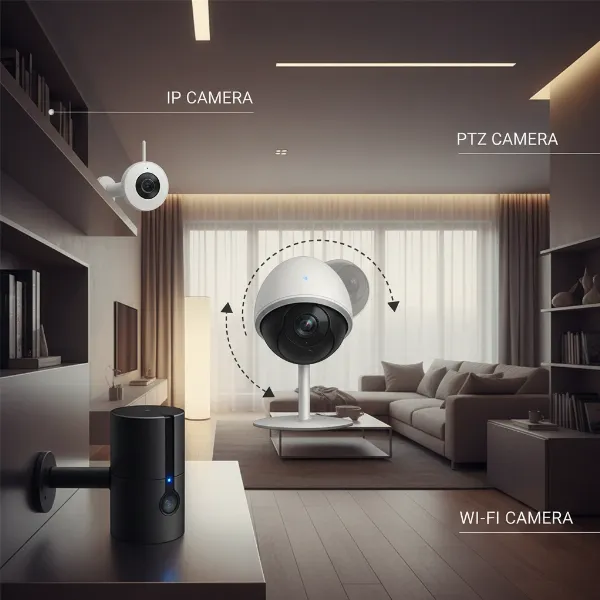 An illustrative graphic showing different types of indoor security cameras like IP, PTZ, and Wi-Fi.
Wi-Fi Cameras
Wi-Fi cameras are essentially a subset of IP cameras, specifically highlighting their wireless connectivity. These cameras connect to your home’s Wi-Fi network, allowing for flexible placement without the need for extensive wiring (though most still require a power cable). This ease of installation makes them a popular choice for renters or those seeking DIY security solutions. Their main advantages include simple setup, portability, and remote access via smartphone apps. The primary drawbacks are their dependence on a strong Wi-Fi signal and, for battery-powered models, the need for periodic recharging. Despite these minor inconveniences, Wi-Fi cameras strike a good balance between convenience and functionality for many homeowners.
Important Features of Indoor Security Cameras
When selecting an indoor security camera, its value is often determined by the array of features it offers. Understanding these capabilities will help you match a camera to your specific monitoring requirements.
Resolution and Image Quality
The clarity of your camera’s footage is paramount, especially when identifying faces or crucial details. Most indoor security cameras offer at least 1080p Full HD resolution, which is generally sufficient. However, for even sharper images and the ability to digitally zoom in without significant pixelation, consider models offering 2K or even 4K resolution. While many cameras rely on digital zoom, which can degrade image quality, a few advanced models feature optical zoom lenses for superior detail retention. Higher resolution footage provides clearer evidence and a better overall monitoring experience.
Field of View and Pan/Tilt Capability
A camera’s field of view (FoV) dictates how much area it can cover. Wide-angle lenses, often offering 130° or more, are ideal for monitoring entire rooms with a single device. For even greater flexibility and comprehensive coverage, many users opt for cameras with pan-and-tilt functionality. This allows you to remotely adjust the camera’s orientation horizontally (pan) and vertically (tilt) through a mobile app, effectively eliminating blind spots and enabling dynamic tracking of movement. This capability is invaluable for large spaces or for actively following an event.
Night Vision
Many security incidents occur under the cover of darkness, making robust night vision a critical feature. Most indoor security cameras utilize infrared (IR) LEDs to capture clear black-and-white footage in low-light or complete darkness. Advanced models may even offer color night vision, which can provide more detailed and informative footage by rendering colors even in dim conditions. Ensure the camera you choose has a sufficient night vision range to cover your intended monitoring area effectively.
Motion and Sound Detection
Effective motion and sound detection are essential for receiving timely alerts about unusual activity. Look for cameras with adjustable sensitivity settings to minimize false alarms triggered by pets or minor environmental changes like fluttering curtains. Many modern cameras incorporate AI-powered detection, which can differentiate between people, pets, and even specific sounds like a baby crying. This intelligent filtering helps ensure you only receive alerts for events that truly matter, enhancing the camera’s utility and preventing notification fatigue.
Data Storage (SD Card, Cloud)
How your camera stores footage is a significant consideration impacting privacy, accessibility, and cost. Local storage, typically via a microSD card, offers greater privacy as footage remains on your device and avoids ongoing subscription fees. However, its capacity is limited, and the footage could be compromised if the camera is stolen. Cloud storage provides convenient remote access to your recordings from anywhere, often with various subscription tiers offering different storage durations and features. Many cameras now offer a hybrid approach, combining local storage for redundancy with cloud backup for accessibility and peace of mind.
Two-Way Audio
Two-way audio is a valuable interactive feature that includes both a microphone and a speaker. This allows you to not only hear what’s happening in your home but also to speak through the camera. It can be an effective tool for deterring intruders with a verbal warning, communicating with family members or pets, or even conversing with a delivery person through a camera positioned near an entry point. This feature adds a layer of interactive security and convenience.
Connectivity and Remote Control
Most indoor security cameras today operate over Wi-Fi, offering seamless integration into your smart home ecosystem. Remote control via a dedicated mobile app is standard, allowing you to view live feeds, review recordings, adjust settings, and receive alerts from anywhere in the world. Compatibility with popular smart home platforms like Amazon Alexa, Google Assistant, or Apple HomeKit further enhances convenience, enabling voice control and integration with other smart devices for a more cohesive automated home security system.
Comparison Table of Popular Indoor Security Camera Models
To help illustrate the differences between popular options, here’s a comparison of three well-regarded indoor security camera models:
| Feature | Arlo Essential Indoor Camera (2nd Gen) | Google Nest Cam (Indoor, Wired) | Ring Indoor Cam (2nd Gen) |
|---|---|---|---|
| Resolution | 1080p (2K for some Arlo models) | 1080p with HDR | 1080p |
| Field of View | 130° Diagonal | 135° Diagonal | 140° Diagonal |
| Night Vision | Color Night Vision | Enhanced Night Vision | Color Night Vision |
| Storage | Cloud (subscription), Local (microSD) | Cloud (subscription) | Cloud (subscription) |
| AI Detection | Person, Motion, Sound | Person, Animal, Vehicle (w/ sub) | Person, Motion, Sound |
| Two-Way Audio | Yes | Yes | Yes |
| Privacy | Integrated Privacy Shield | Activity Zones | Privacy Zones, Shutter |
| Smart Home | Alexa, Google Assistant | Google Home | Alexa |
| Price (Approx) | $30 – $80 | $99 | $30 – $60 |
How to Buy an Indoor Security Camera
Choosing the right indoor security camera involves more than just picking a popular model. A thoughtful approach ensures you invest in a system that truly meets your needs.
Determine Your Needs
Before diving into specifications, clarify why you need an indoor security camera. Are you primarily looking to monitor your pets while at work, keep an eye on your children, ensure the safety of an elderly relative, or simply add an extra layer of security against intruders? Your specific use cases will dictate the essential features, such as two-way audio for communication, advanced AI detection for pet monitoring, or continuous recording for comprehensive security. Defining these needs will narrow down your options significantly.
Budget Considerations
Indoor security cameras range widely in price, from budget-friendly models offering basic functionality to premium systems with advanced AI and smart home integration. Set a realistic budget that aligns with the features you require. Remember that some cameras, particularly those relying heavily on cloud storage or advanced AI, may involve ongoing subscription fees in addition to the initial purchase cost. Factor these long-term expenses into your overall budget.
Reputable Brands
Opting for cameras from established and reputable brands can provide greater assurance regarding product quality, security, and customer support. Brands like Arlo, Google Nest, Ring, Eufy, and Wyze are well-known in the smart home security market, offering a range of reliable products and often consistent firmware updates. While smaller brands can offer competitive prices, research their reliability and privacy track record thoroughly.
Review Specifications Carefully
Once you have a clearer understanding of your needs and budget, meticulously review the specifications of potential cameras. Pay close attention to resolution, field of view, night vision capabilities, types of motion/sound detection, and storage options. Ensure the camera’s features directly address your priorities, such as a wide-angle lens for monitoring a large living room or intelligent person detection to avoid alerts from pets.
Consult User Reviews and Expert Opinions
Real-world feedback from other users can be invaluable. User reviews often highlight practical aspects of a camera’s performance, ease of use, app functionality, and common issues that might not be apparent from product descriptions. Complement these with expert reviews from technology publications to gain a balanced perspective on a camera’s strengths and weaknesses, especially regarding features like video quality and connectivity stability.
Warranty and Support Policy
A robust warranty and responsive customer support are crucial for any electronics purchase. Check the manufacturer’s warranty period and understand their policy for repairs or replacements. Good customer support can be a lifesaver if you encounter technical issues during setup or operation. This ensures that your investment is protected and you have assistance available if needed.
Top Picks – Reviews of the Best Indoor Security Camera Models
When it comes to selecting the best indoor security camera, a few models consistently stand out for their blend of features, performance, and user satisfaction.
Arlo Essential Indoor Camera (2nd Generation)
The Arlo Essential Indoor Camera (2nd Generation) is an excellent choice for those seeking a reliable and feature-rich camera, particularly if you’re already part of the Arlo ecosystem. It delivers sharp 1080p video, often with impressive color night vision capabilities, providing clear footage day and night. A notable privacy feature is its integrated automated privacy shield, which physically covers the lens when you’re home. It offers flexible storage options, including local microSD card storage and cloud storage with an Arlo Secure subscription, which also unlocks advanced AI detection for people, pets, and packages. This camera integrates well with Amazon Alexa and Google Assistant, offering convenient voice control. Its main draw is the combination of solid performance, privacy features, and ecosystem compatibility.
Google Nest Cam (Indoor, Wired)
The Google Nest Cam (Indoor, Wired) is a premium option known for its seamless integration with the Google Home ecosystem and advanced intelligent alerts. It captures crisp 1080p HDR video with a wide 135-degree field of view and enhanced night vision. What truly sets it apart is its on-device processing, which provides smarter alerts, differentiating between people, animals, and vehicles, even without a subscription for basic alerts. A Nest Aware subscription further enhances these capabilities with familiar face detection and 24/7 continuous recording. It boasts robust two-way audio and integrates flawlessly with other Google devices, making it an ideal choice for users deeply embedded in the Google smart home environment. The wired connection ensures consistent power and reliability, though it may limit placement flexibility compared to battery-powered options.
Ring Indoor Cam (2nd Generation)
The Ring Indoor Cam (2nd Generation) offers a compelling balance of affordability, features, and integration, especially for those in the Amazon Alexa ecosystem. This compact camera provides clear 1080p HD video with a wide 140-degree diagonal field of view and color night vision, ensuring good visibility in various lighting conditions. It includes two-way audio, allowing for easy communication. A key privacy feature is its manual privacy shutter, letting you physically block the camera and microphone when privacy is desired. While it offers basic motion alerts for free, a Ring Protect subscription unlocks cloud video storage, person detection, and customizable motion zones. Its quick setup and strong integration with Alexa and other Ring devices make it a highly accessible and practical choice for monitoring indoor spaces.
“Indoor security cameras have transitioned from mere surveillance tools to integral components of a smart, secure home. The peace of mind they offer, coupled with their ability to connect us to our homes even when we’re away, makes them a truly valuable asset.” – Admin, ReviewByMo.com, Security Camera Expert
Conclusion
In conclusion, an indoor security camera is undoubtedly a worthwhile investment for most homeowners. The advantages, ranging from deterring crime and providing crucial evidence to offering peace of mind by allowing you to monitor loved ones and pets, far outweigh the initial cost and minor privacy considerations. With advancements in technology, modern indoor security camera models now boast high-resolution video, intelligent motion detection, two-way audio, and seamless smart home integration, making them more powerful and user-friendly than ever before.
By carefully considering your specific needs, budget, and desired features, you can select the perfect indoor security camera to enhance the safety and security of your home. Whether it’s for monitoring a baby’s nursery, checking in on an elderly parent, or simply adding an extra layer of protection against potential intruders, an indoor security camera empowers you with vigilance and control. Are you ready to take the next step in securing your sanctuary?
Frequently Asked Questions
Are indoor security cameras an invasion of privacy?
While privacy is a legitimate concern, many indoor security cameras include features designed to mitigate these worries. Options like mechanical privacy shutters, which physically block the lens, or scheduled recording, which only activates during specific times, allow users to maintain control over when and what is recorded. Placing cameras in common areas rather than private spaces also helps respect the privacy of household members and guests.
Do indoor cameras record 24/7?
Not all indoor security cameras record 24/7. Many models offer continuous recording, especially when connected to a wired power source or a robust cloud subscription. However, to conserve storage space and bandwidth, many cameras default to motion-activated recording, capturing clips only when activity is detected. Some advanced systems offer a hybrid approach, allowing continuous recording with intelligent event markers.
Can indoor security cameras be hacked?
Like any internet-connected device, indoor security cameras can theoretically be vulnerable to hacking. However, reputable manufacturers implement strong encryption, multi-factor authentication, and regular security updates to protect against unauthorized access. Users can further enhance security by using strong, unique passwords, enabling two-factor authentication, and keeping their camera’s firmware updated.